Travel Policy
Policy Highlights
Individual Travel
- Travelers are required to book under the rate maximum for the location they are spending the night, unless staying at an externally hosted conference-designated hotel.
- For rate maximum or availability exceptions: When a UW System traveler cannot obtain a room within the UW System’s maximum rate for the required location Concur will be utilized for the reservation and the user may reserve the lowest available rate for the lodging supplier closest to the business location. The reimbursement must contain an explanation for this exception.
- To keep with the UW Duty of Care initiative, travelers are strongly encouraged (but not required) to make all reservations within Concur or with the designated contracted travel agency.
- Sales tax must be removed whenever the University has sales tax exemption in the state.
Group Travel
- Group travel for lodging is typically defined as 10 or more rooms.
- Group lodging typically requires a hotel contract which must be routed through the institutions’ purchasing office for signature
- Preferred properties should be given priority selection of group lodging. View preferred hotels on the hotel directory.
Lodging Reservations and Payment Procedures
Lodging Payment and Procedures
Maximum rates for lodging in the United States exclude taxes and fees. Foreign lodging maximums include taxes and fees.
Reservations within Wisconsin must be made within the maximums prescribed, and by requesting the State of Wisconsin’s tax exempt status. Employees must present their University issued, tax exempt wallet card to obtain tax exemption, as Wisconsin tax must not be paid and will not be reimbursed. It is the traveler’s responsibility to obtain a University tax exempt card and to present the card at hotel check-in. Travelers must review the lodging folio prior to check-out to ensure taxes are not charged. Lodging suppliers are not required by law to refund tax regardless of exemption and may not accommodate a request to do so.
For travel arrangers that make lodging reservations for others, it is the travel arranger’s responsibility to obtain required tax exemption by providing the lodging property the University’s tax exemption certificate at time of reservation or prior to the traveler’s stay.
For out-of-state lodging, travelers and travel arrangers are encouraged to save departmental travel dollars by obtaining tax exemption from lodging establishments that acknowledge Wisconsin’s tax exempt status. Find a list of tax exemptions permitted by state under the Policy & Resource section of the portal, and follow the specific state’s directions for obtaining the exemption. Note that not all out-of-state tax exemptions apply to travel related purchases.
Value Added Tax
Value added tax (VAT) and other taxes levied by foreign countries are payable. Federal maximum rates for the location are inclusive of VAT and all other taxes. University departments and individual employees are prohibited from personally filing for refund of all international taxes paid or reimbursed by the UW.
UW System Administration has formally contracted or partnered with other consortium or peer programs (referred to as “Partnership Program Properties”) by agreement. UW System contract properties and partnership property program hotels were selected based on the following criteria:
- Rates for standard sleeping rooms at government, negotiated and/or discounted rates that are within UW System Travel Policy rate limits for the location & season of travel
- Quality of accommodations – Industry rating of 3 stars or above
- Existing UW volume use of property or properties within location - based on recent UW financial spend data
- Proximity to primary business locations within Wisconsin and for other domestic locations
- Consistent room availability at contract or partner program rates with limited blackout periods.
- No prepayment requirements – per UW System policy
- Lenient cancellation policies
- Included amenities that would have otherwise cost the UW additional dollars
Per Policy, University travelers are required to use UW System contract or partnership program properties at contract or negotiated rates whenever use of commercial hotel is required and a contract property is available in the location.
The primary means of accessing UW contract or partnership program properties and rates is by making reservations in Concur or with one of the contracted travel agencies.
When the traveler is attending a conference or meeting where group lodging rates and reservation requirements have already been established, the traveler will follow the reservation procedures provided by the organizer.
UW System contracts are with individual properties located throughout the State of Wisconsin and in high cost domestic top travel locations. In addition, the UW System has a chain or brand-wide agreement with the following:
La Quinta Inn & Suites - The La Quinta Inn & Suites brand is the perfect fit for the economical traveler or student groups looking to conserve funds. La Quinta's are located almost everywhere and cover many of the UW System’s top travel destinations. The UW System’s contract provides for complementary Wi-Fi, airport shuttle service and breakfast at state government rates (or below) for all locations domestically and in Mexico. Airport locations also have “Park and Fly” accommodations for a nominal parking fee. The Milwaukee airport location has rates as low as $70 and you can leave your car there while you’re gone to save airport parking. View the directory of all La Quinta locations
Drury Inn and Drury Suites - Drury Inn and Drury Suites are a mid-scale and family owned hotel brand that offers great value for the business traveler. Typically located in city center or near airport the UW System’s contract offers discount off best available rate nationwide and government rates (or lower) at the following locations:
• New Orleans, Louisiana
• Atlanta, Georgia
• San Antonio, Texas
• Austin, Texas
• Denver and Westminster, Colorado
Included in the rate are the following additional amenities: free Wi-Fi, free hot breakfast, free 5:30 kickback (complementary adult beverages and hot buffet). Additionally, we have a chain-wide discount off best available rate for the rest of the Drury Inn & Suites, Drury Plaza and Pear Tree Inn locations. View the Drury Directory for all locations.
Graduate Brand – Graduate Hotels are a well-curated, thoughtfully crafted collection of boutique, collegiate themed hotels that are located within the most dynamic college towns across the country.
Club Quarters - UW System offers membership rates at all Club Quarters properties. Club Quarters Hotels are full service hotels designed for business travelers in bustling urban destinations with limited or no blackout dates.
The UW participates by Partnership Program agreement with affiliated organizations to offer lodging rates at state or government maximums in top travel destinations. These rates are exclusively offered within Concur or with one of the contracted travel agencies.
University of Chicago's and Big Ten Alliance
The University of Chicago and Big Ten Alliance (formerly known as the Committee for Institutional Cooperation - CIC) have extended their contract lodging properties to the UW System. The University of Chicago's contracted hotels are located throughout the downtown Chicagoland area and also serving Midway Airport.
Federal Government's Staterates program
The UW System participates in the Federal government’s “Staterates” program. These lodging contracts are owned by the General Service Administration (GSA). The Staterates program provides public universities, state and local government employees with 3,000 properties worldwide with rates available at or below the federal government employee rate for the location.
NASPO/WSCA government rate program
The UW System participates in the Western States Contracting Alliance (WSCA) and National Association of State Procurement Officials (NASPO) consortium based lodging contracts which contain over 11,000 qualified lodging facilities that have rates at or below the Federal lodging rate for the location.
Other Savings Opportunities
Triple A - AAA discounts for members, proof of membership required at check-in. Note: Users must select the AAA check box as a hotel preference in their Concur profile for these rates to display in search. Member Id will be required at check-in.
AARP - AARP discounts for members, proof of membership required at check-in. Note: Users must select the AARP in their Concur profile for these rates to display in search. Member Id will be required at check-in.
Fox World Travel BCD Consortium Rates - Fox offers UW System travelers the unique benefits of the BCD Consortium hotel program. This program offers access to discounts from widely used nation-wide chain and independent properties. This program is designed to provide the best value and pricing for key travel destinations, but also to supplement where specific UW System contract or partnership program hotels may not exist.
There are 43,000 properties in 179 countries with this program. Program offerings may include:
- Discounts off BAR (best available rate)
- Free WiFi
- Free parking
- Free breakfast
Note: These rates and room types are listed as BCD or BJZ within Concur and are not specific to the University's rate or room type limits. Users are reminded to know the rate maximum for the location prior to reserving their accommodations.
Required reservation methods for individual lodging reservations are Concur, with one of our contracted travel agency partners or with the hotel directly, as further defined below. Third party website bookings are not allowed.
Contracted and partnership program properties are designated as “Most Preferred” or "Preferred" within Concur and will display first in search. Users can search for lodging by airport location, street address, reference point/zip code or by company location – all UW institutions are listed under the company location drop-down menu.
Rates and room availability constantly change based on anticipated occupancy so travelers and arrangers are reminded to make reservations well in advance of travel to ensure best rates and availability. Concur is web based so you can make reservations from anywhere with internet connection.
Individual Reservations
- Concur - Use of Concur is recommended for access to UW System contract and Partnership Program properties with negotiated rates. This option includes state government rates when available.
Concur provides live room rates and availability received directly from the lodging property(s) and therefore properties, rates and room types are not specific to University rate maximums. By policy, Concur is reserve only and payment is required at check-out (unless the rate is a pre-paid rate).
- Book with an agent - This process is fast and efficient. When working with an agent for lodging reservations, advise the agent of the maximum for a single/standard room for your location. .
- Conference or Meeting Reservations – Use the hotel link or phone number provided by the organizer to reserve your conference or meeting-site hotel. Verify that the daily room rate quoted in the reservation system matches the advertised rate for conference participants. Note: Users are highly encouraged to search Concur for the conference hotel(s) as often rates found within Concur are less costly than the conference rate.
- Contact the hotel directly (either via phone or the hotel website). Third party website bookings such as Expedia, Travelocity, Orbitz and Hotels.com are not allowed.
Per UW System policy which prohibits advance payment of lodging, rates and room types that require advance payment or don’t allow for cancellation are blocked from display. At time of Concur reservation, users are required to review and acknowledge the cancellation policy of the hotel property and refund policy if a one night deposit is required. It is the responsibility of the traveler to understand and abide by the terms and conditions associated with the reservation, including deposit and cancellation requirements. Travelers must cancel reservations that they will not use or may be held personally responsible for the cost.
Multiple Reservations or Group Blocks
When departmental coordinators are arranging lodging for multiple travelers or when arranging meeting/events at commercial lodging facilities that include group room blocks, UW System contract or partnership program properties will be used when available in the location and rooms are available at the contract or negotiated rate.
The reservation options for making multiple reservations or for group block are as follows:
- Concur – Concur is recommended for use of making 1-5 individual reservations. When using Concur, you can only make one reservation at a time so those making reservations will have to repeat the steps to make multiple reservations. Travelers or arrangers can use the "Clone" functionality to speed the process.
- Agents – Fox World Travel (or Short's for athletics) agents can make reservations for multiple travelers that are paying individually. For individual lodging reservations that are part of group air or an Administrative Group, follow the Group Procedures.
- Groups that require 10 or more rooms
- Fox World Travel Group Block - Fox has been contracted for UW group block business, including lodging contracts where 10 or more rooms are needed.
- By Phone - Contact the property directly by phone for group block reservations (typically 10 or more rooms or multiple travelers sharing accommodations). Request the UW System or partnership program rate. Phone reservations are limited to groups as defined above.
Payment: Payment option must be determined prior to making reservations for groups. Unless travelers will be paying individually at checkout, all centralized payment will require completion of the hotels credit card authorization form regardless of reservation method. Arrangers will contact the hotel property to set this up for payment by University card post-check out. Group block reservations and other meeting/event needs for space, equipment rental and catering services require a contract/agreement that must be reviewed and approved by the institutional Purchasing Office.
In exceptional circumstances, when rooms within the University’s maximum rate are not available for the location, Concur will be used to reserve a room at the least costly rate closest to the business need. UW System or Partnership program will be used at the least costly rate for this exception whenever possible.
Documentation of this exception requires an explanation, Concur reservation/itinerary received from the agency at time of reservation and the hotel provided receipt.
For travel that requires a multi-night stay, the hotel may offer a different rate for one or more nights of stay. This may occur during high demand periods or over weekends. These rate differentials will be allowed with explanation providing that the total cost for all room nights averages to no more than the University's nightly rate maximum for the location.
The externally arranged conference or event brochure, registration or other documentation from the event sponsor must identify the conference site hotel or the recommended properties to substantiate the rate charged was the conference or event rate to qualify for payment which may be higher than the University’s maximum for the location. When the event is held at a convention center and/or attendees are given multiple lodging options for the event, they should choose the least costly option that meets the business need.
Should the traveler choose to stay at a property not on the sponsor’s recommended list, the traveler will be limited to the maximum for the city location, even if the traveler’s choice is less costly than the conference properties, as the traveler is not getting the additional benefits allowed with this exception.
The University does not require that business travelers share lodging accommodations, although this may be an option to conserve department travel funds. In cases where University business travelers elect to share accommodations, travelers may either split the lodging expense evenly (requesting the lodging supplier split the cost of a double occupancy room between travelers), or the bill may be paid in full by one traveler. The expense reports for all travelers must include documentation to show the double (triple, quad, etc.) occupancy and identify which traveler(s) incurred the expense. Travelers may be reimbursed in full when paying for a shared room on behalf of another University business traveler from the same institution.
The University will not pay or reimburse any additional costs associated with taking a non-business related travel companion along on a University business trip. The traveler is responsible for paying any additional occupancy charges. No additional processes or documentation is required if there is no additional charge for extra persons in the room.
As a standard, lodging properties address room deposits and guarantees in their terms and conditions and travelers are responsible for understanding and adhering to these requirements.
It is customary for lodging properties to require a charge card to guarantee a room reservation with the card to be charged at checkout, some lodging properties offer reduced rates for full pre-payment. Usually these are also non-refundable.
The University does allow for full pre-payment of lodging. It may be paid directly by the University or by the traveler if the requirement is documented by the lodging property. If the traveler subsequently does not travel, the University will only reimburse the traveler when they are unable to obtain a credit or refund from the hotel or with an explanation as to why the travel did not occur as planned – both require an explanation and approved exception. Group reservation deposits or guarantees are contingent upon contractual requirements of the lodging establishment and will be prepaid as required by a Purchasing approved agreement or contract.
When travelers need to cancel or change reservations due to circumstances it is their responsibility to cancel the reservation in Concur, with an agent or contact the lodging property directly to avoid any charge for the room(s) or related penalties. No show penalties, cancellation penalties, early departure or late checkout fees, etc. are only reimbursable with justification and approval as unavoidable. Some examples of unavoidable circumstances are:
- Flight cancellations or delays that prevent room usage or contact with the hotel.
- Short notice of cancelled conference/meeting or date changes which did not permit cancellation.
- Early departure due to unexpected illness of employee, or illness or death of a direct family member.
- Delayed departure while at destination due to employee illness preventing timely checkout.
Use of UW System contract and Partnership Program properties with reduced or eliminated penalties are advantageous in these circumstances.
Approved methods for payment of lodging are the Purchasing Card or US Bank Corporate Travel Card. Use of these cards generate rebates back to the institution or traveler's department, furthering containment of travel costs. System institutions may permit payment options beyond these, but travelers should consult with their institutional Travel Manager for additional guidance prior to using any other payment method.
Travelers who pay for their lodging with a US Bank Corporate Card or with personal funds (if permitted by their institution) will submit the lodging folio/receipt for reimbursement. Travelers who have had their lodging paid by University Purchasing Card must submit a copy of the itemized receipt with their travel expense report (original remains with purchasing card log) to document all costs associated with the trip.
If the traveler does not have access to a University Purchasing Card, and is unable to afford payment of lodging, the traveler may seek assistance from their employing department for the room guarantee. This may include use of a department Purchasing Card, travel advance (if permitted by the institution), or some other method.
Any University lodging that was not personally paid (paid by the University through other means) must be identified as such on the travel expense report.
The payment or reimbursement of lodging must be substantiated in accordance with the following IRS rules and University policies:
- All lodging payments and reimbursements must be supported by an original, itemized receipt from the lodging establishment showing the daily room rate, taxes, guest name(s), dates of stay, type of accommodation (i.e. single/standard, double, etc.), all other room charges, and that payment has been made. Credit card statements do not suffice.
- The date and location of the expense.
- The business purpose of the expense.
- For domestic lodging, taxes must be entered as a separate entry from room cost.
- Any incidental expense included in the M&IE per diem allowance is not claimed as part of lodging reimbursement
- Additional expenses shown on the lodging receipt should be separately itemized on the travel expense report, as other policy and/or rate limitations may apply to those costs.
- For external conference lodging, documentation showing the conference lodging location and rate(s). This is typically available on the conference brochure or the registration form.
- For rate/availability exceptions – explanation of exceptional circumstances, Concur reservation/itinerary received from one of the contracted agencies at time of reservation and the hotel provided receipt.
- When the University direct pays lodging expenses, the amount must be included on the expense report to account for the expense as part of the total trip cost. Include the cardholder name that paid the expense if the card was not in the traveler's name.
Expense reporting process when lodging is shared by business travelers
- The traveler paying for the lodging claims reimbursement, and
- Expense reports for both travelers include the double occupancy information and identify which traveler incurred the expense.
Payment or reimbursement for campground or a non-commercial lodging facility must be supported by a receipt, received directly from the supplier, and include the following required information:
- Name and address of supplier
- Dates of stay
- Daily rate
- Taxes and any other fees for each day of stay
- Proof of payment
Understanding that some campgrounds or non-commercial lodging facilities are non-attended, which limits the receipt detail, the highest form of receipt from the supplier is acceptable, providing any missing information as required above is explained by the traveler on the payment/reimbursement request.
Travelers are responsible for obtaining the required receipts. In the case of lost or missing lodging receipts, travelers must obtain a copy from the lodging supplier to qualify for reimbursement of the expense.
Travelers are highly encouraged to sign up for supplier e-receipts directly in Concur when using the tool for making reservations. A receipt/lodging folio will be emailed to the traveler at check-out directly from the property.
When payment is made in a foreign currency, the receipt must be translated and then converted to US dollars for reporting on the expense report. The Oanda currency conversion tool will be used as the University's standard application for foreign currency conversion. If the purchasing or corporate card was used to pay for lodging, that statement can be used to show the converted rate charge. Any fees associated with the conversion to US dollars are reimbursable as a miscellaneous expense. If the traveler paid for lodging with cash using funds converted at a bank and has a receipt showing the conversion exchange rate, that rate can be used and the receipt attached to the expense report.
Payable/Reimbursable Expenses
The following expenses are allowable and may be paid/reimbursed with University funds:
- The cost of a single/standard room within the established maximums for the location, per University traveler.
- The actual costs, up to the location maximum, for non-commercial lodging as specified in policy.
- The cost of extended stay or rental property for long-term lodging needs as specified in policy.
- Required lodging deposits as documented by the lodging supplier.
- Actual costs for lodging from an externally sponsored conference site or list of conference recommended hotels.
- Imposed municipal or facility use fees charged as a separate line item (not included in lodging rate).
- Out of state, domestic or international lodging taxes.
- No show expenses or other penalties charged for late cancellation or late check-out when unavoidable, with justification and approval. Some examples of allowable circumstances are:
- Flight cancellations or delays that prevent room usage (with documentation).
- Short notice of cancelled conference/meeting or date changes which prevented cancellation within the required timeframe of the hotel.
- Early departure fee when incurred due to the unexpected illness of traveler, or illness or death of a direct family member.
- Late check-out fees incurred due to a traveler illness which delayed departure.
Non-Payable/Non-Reimbursable Expenses
The following non-inclusive list of expenditures will not be paid or reimbursed with University funds:
- Lodging purchased outside of policy - including:
- Lodging purchased through an online broker.
- Lodging purchased as part of a “package” bundled with air and/or vehicle rental, unless the package was purchased from the UW contract travel agency.
- Taxes for in-state lodging.
- Additional charges added to the lodging folio that are deemed non-business related such as charges from gift shops, spas, in-room movies, or other types of personal expenses or costs included in the M&IE per diem.
- Additional costs for upgraded rooms and suites.
- Additional costs for personal days added to a reservation.
- Additional costs for amenities or non-business related services (fitness room access, use of safe, etc.).
- Additional costs for travel companions, including pets not on authorized business.
- No show expenses or other penalties incurred for non-cancellation or late cancellation of reservations.
- Late checkout fees.
- Security deposits, damage deposits, pet deposits, etc. related for lease agreements.
Concur Lodging Booking Procedures
The Lodging and Meal Per Diem Calculator must ALWAYS be utilized when determining what hotels are within the daily rate maximums allowed for the date and location of travel. Concur isn’t always accurate when determining what is in and out of policy.
It is the traveler’s responsibility to verify that the total cost of the stay (excluding taxes) falls within the lodging allowance. The official source to verify the maximum allowable rate is the Lodging and Per Diem Calculator.
Accuracy of Concur’s “In-Policy” Rate Notification:
- Concur may inaccurately flag a hotel as “in policy” because it can only display rates in whatever format the hotel provides, which varies by property.
- This is misleading because hotels often send varying data, such as only the first night’s rate or an average for the stay, rather than a full daily breakdown.
- Because nightly rates often fluctuate, the initial search results may not reflect the actual cost of every night.
How to Check Your lodging Rates in Concur:
Before you finalize any reservation, use these methods to verify your rates:
- The Info Bubble
Click the blue “i” icon next to the nightly rate. This will often flag if the “Rate changes over
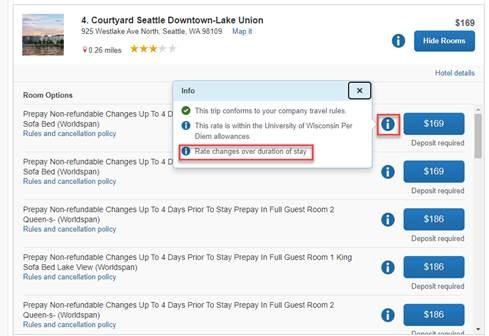
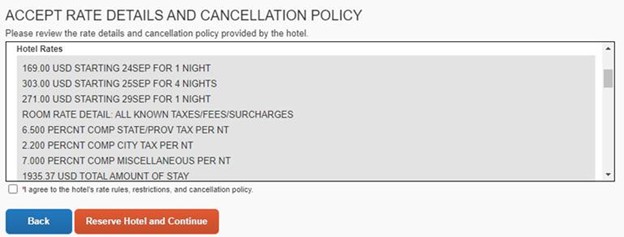
2. Select the “Rules and cancellation policy” link under the room description. This opens a pop-up with a night-by-night cost breakdown and the total amount for the stay.
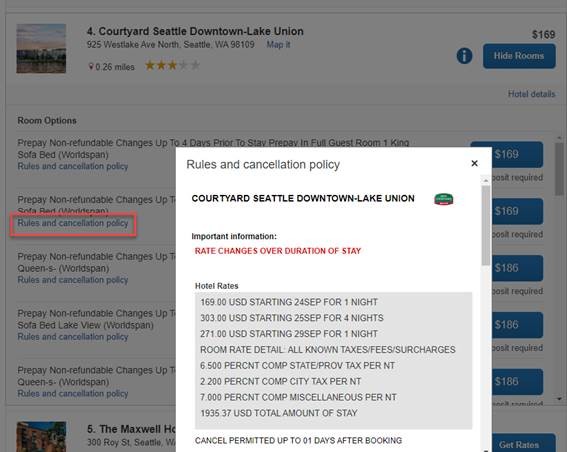
3. The Agreement Box
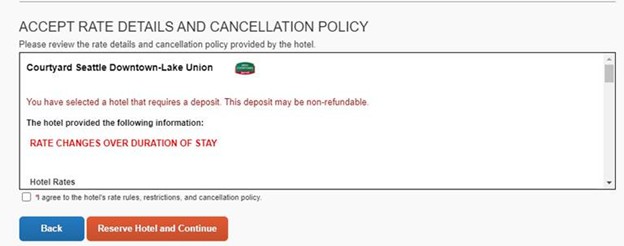
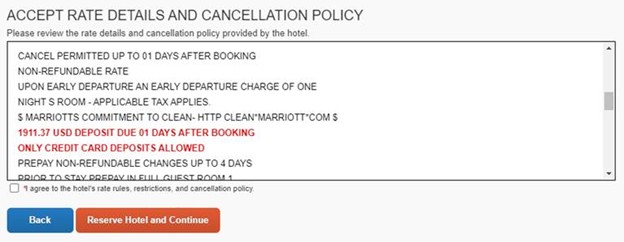
On the final booking page, review the “Accept Rate Details” Scroll through this entire section to see the total amount of the stay
Once selecting a room rate and moving to the next step, Concur advises that before checking the box that says “I agree to the hotel’s rate rules, restrictions and cancellation policy” the traveler/booker should make sure they are reviewing everything in that box, as it has the detailed information on what is about to be booked. (screenshots show scrolling down in the box)