As part of the Fall 2026 feature release, the Workday mobile app menu was updated on September 19, 2026. The mobile menu now looks more like the Workday desktop version, making it easier to find what you need.
What’s New:
The mobile navigation now more closely matches the Workday desktop version:
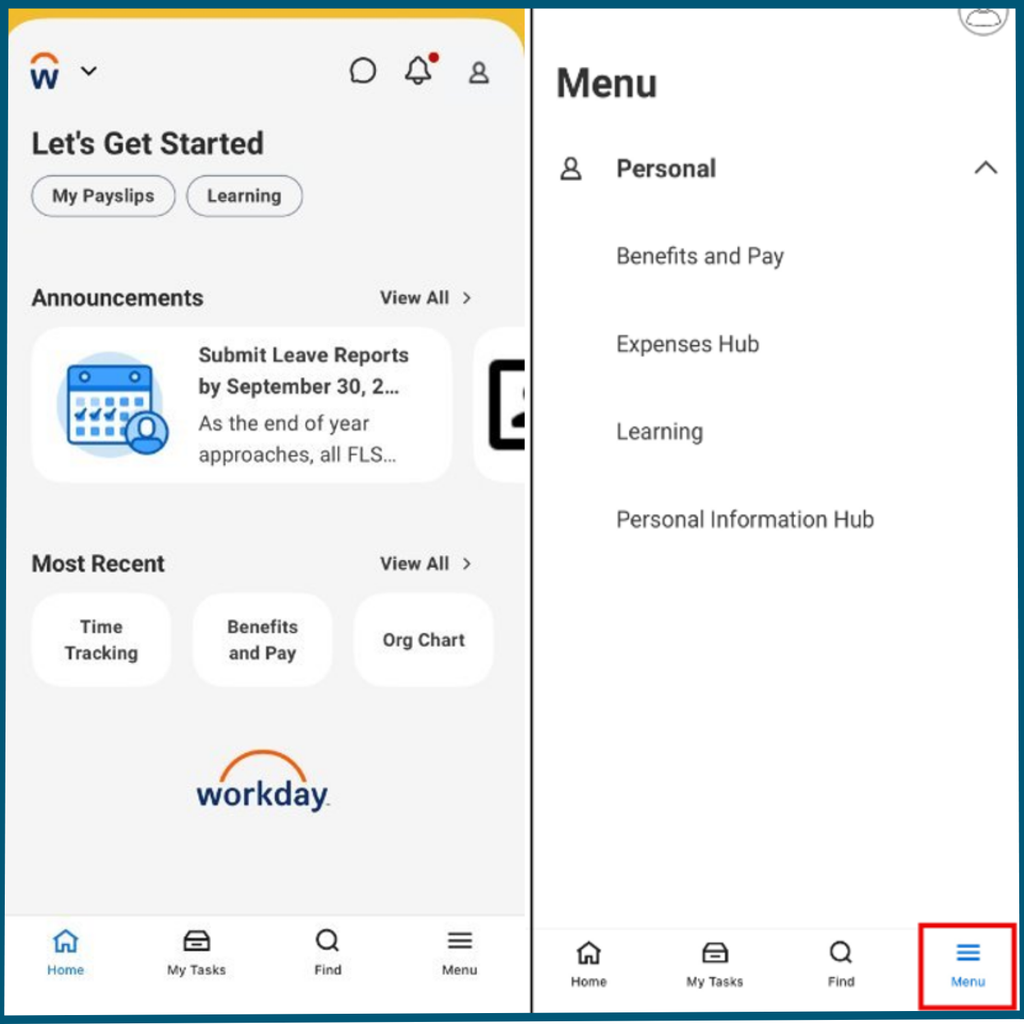
- The Apps tab has been replaced by the Menu tab. This matches the Global Navigation Sidebar on the Workday desktop version.
- The Profile tab has been removed. You can now access your Profile by selecting the profile icon.
- Return-from-leave tasks are now available on mobile. You can now complete return-from-leave tasks using the Workday mobile app.
Note: Not all desktop menu items are available on mobile. Some menu item names may also be different between desktop and mobile versions.
Helpful Workday Mobile Tasks
You can use the Workday mobile app to complete several tasks while you’re on the go. The following resources can help:
Scanning Receipts: Scan receipts and other documents using your mobile device.
Submitting Expense Reports: Start and submit expense reports from your mobile device.
Approving Transactions: Approvers with the appropriate security roles can review and approve transactions from their mobile device.
Training and Support
Support resources are being updated to help you navigate any new functionality.