What’s Changing?
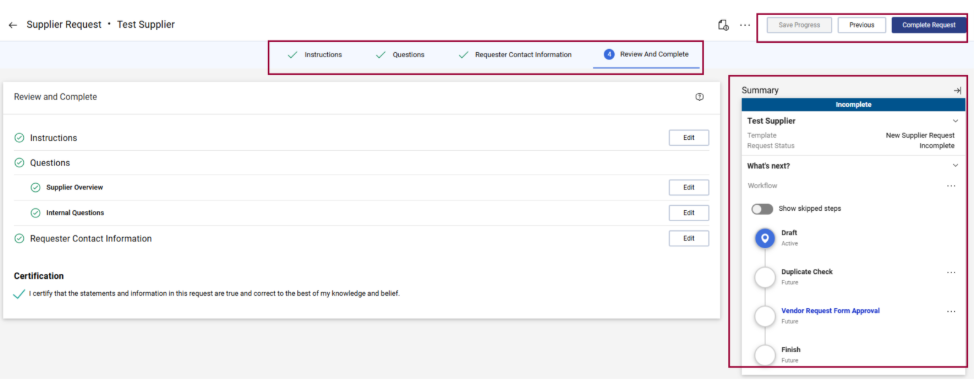
The Supplier Request forms in ShopUW+, including the Supplier Bid Profile Conversion to Business form, will have a new layout. The forms will now include tabs at the top and a Summary workflow that shows where the request is in the approval process.
Starting March 30:
When requesting a new supplier or making a change to an existing supplier, users will see a new form layout with tabs at the top of the page instead of the left-side menu.
New tabs include:
- Instructions
- Questions
- Requester Contact Information
- Review and Complete
Some fields have also moved to different sections. In addition, a Summary workflow will appear on the right side of the form, showing the status of the request in real time (you may need to refresh the page to see updates).
ShopUW+ Supplier Request Forms Affected:
- New Supplier Request
- Supplier Change Request
- Supplier Change: Insurance, Diversity, and Affirmative Action Change
- Bid Profile Conversion to Business
Training and Support
- Visit the Workday Job Aid Library to access related KnowledgeBase resources that will be updated on Monday, March 30, at 7am to help transition this new process:
- For Workday questions or support, explore Get help resources on the Workday website.