The Universities of Wisconsin has access to Microsoft Copilot as an Enterprise Tool, an AI-powered assistant that helps with various work tasks like writing, research, and brainstorming. With your UW login, you have access to Microsoft 365 Copilot Chat, which is included with your Microsoft 365 license at no additional cost. This is different from the premium paid version called Microsoft 365 Copilot ($30/user/month).
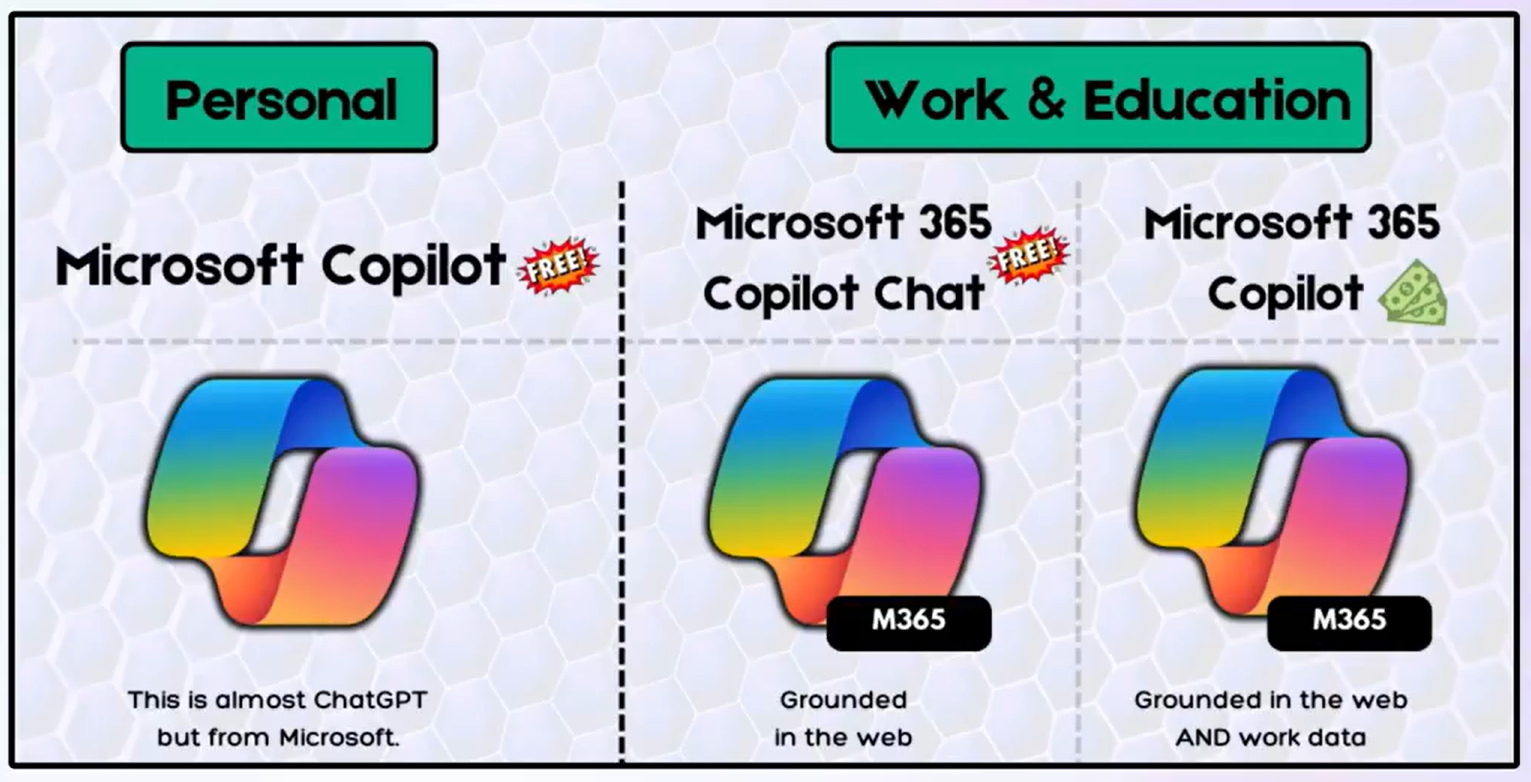
What Microsoft 365 Copilot Chat Can Do:
- Enterprise data protection – Your conversations are secure and not used to train AI models. Prompts and responses are protected by the same contractual terms and commitments Microsoft promises to emails in Outlook and files in Teams/SharePoint.
- Web-based research – Get answers using current information from the internet
- Content assistance – Help with documents you’re currently working on (you’ll need to copy/paste content or work within an open file)
- Access to advanced AI models – Powered by OpenAI’s latest language and image-generating technology
What You Cannot Do, Unless you have a Paid License:
- Cannot automatically search your emails, OneDrive files, or SharePoint documents
- Cannot access your Teams chat history or calendar
- Cannot pull information from across your organization’s data without you providing it
Note: If your role requires AI that can automatically access and search your organizational data (emails, stored documents, Teams conversations), contact the helpdesk about Microsoft 365 Copilot licensing.
Getting Started
- Visit copilot.microsoft.com
- Click “Sign in” at the top of the page
- Select “Sign in with a work or school account”
- Enter your UW employee email address
- Complete the UW SSO login
- Look for the shield badge at the top of the page – this confirms enterprise data protection is active
Important Reminders:
- Microsoft 365 Copilot Chat only works with web data – If you need it to reference an internal document, you must copy/paste that content into your prompt
- Think critically – AI is a tool to assist you, not replace your judgment or expertise
- Human guidance matters – Copilot doesn’t replace advisors, mentors, or colleagues
Need More Capabilities?
If your work requires AI that can:
- Automatically search and summarize your emails
- Find information across your OneDrive and SharePoint files
- Generate PowerPoint presentations from existing documents
- Summarize Teams meetings and conversations
…you may benefit from Microsoft 365 Copilot (paid version). Contact the helpdesk to discuss your needs and explore licensing options.
Understanding the Difference: Free vs. Paid Copilot
| Feature | Microsoft Copilot (Included with your license) | Copilot for Microsoft 365 ($30/month) |
|---|---|---|
| Cost | Included with your M365 license | Additional $30/user/month |
| Data Access | Web/internet information only | Automatic access to your work emails, files, Teams, and calendar |
| How It Works | You paste content into chat | It searches your data automatically |
| App Integration | Available in apps, works with currently open files | Fully embedded – can reference any file you have access to |
| Email Assistance | Can help draft emails you’re writing | Can summarize your email history and find specific messages |
| Document Search | Cannot search your stored files | Can find and reference documents across OneDrive/SharePoint |
| Teams Integration | Cannot access chat history | Can summarize meetings and conversations |
| Use Case | General writing, research, brainstorming | Knowledge work requiring organizational context |
| Data Security | Enterprise-grade security | Enterprise-grade security |
| Compliance | FERPA/HIPAA compliant infrastructure | FERPA/HIPAA compliant infrastructure |
The Key Difference
Microsoft 365 Copilot Chat (free) knows what the internet knows. It’s excellent for general tasks, writing assistance, and web research.
Microsoft 365 Copilot (paid) knows what your organization knows. It can automatically search and incorporate your work emails, documents, and conversations into its responses.
Why Both Are Secure
Both versions operate within UW’s managed Microsoft 365 environment:
- Your data never leaves the Microsoft 365 tenant
- Uses Microsoft’s Zero Trust security architecture
- Your conversations are not used to train AI models
- Complies with FERPA, HIPAA (where applicable), and UW data policies
- Subject to the same security rules as Outlook, OneDrive, and SharePoint
This is fundamentally different from public AI tools like ChatGPT, Claude or Gemini, which don’t operate within UW’s secure infrastructure.
Quick Reference: Test Your Access
Want to confirm which version you have? Try one of these:
Ask Copilot:
- If you have the free version: It will say it cannot access your emails
- If you have the paid version: It will summarize your recent emails
Questions? Contact the IT helpdesk for assistance.
Other Links
- Find out more information at AI at the Universities of Wisconsin
- Interested in our community of practice? Come join us!