
Introduction
This guide is intended for high school staff who will be responsible for verifying the accuracy of the data in the .csv file and ensuring that the transcripts are properly formatted. You should have completed the initial setup in your SIS prior to running the offline report for academic review. Based on your SIS, complete the following steps to generate the file for academic review (for internal review)
Running the reports
Each SIS has created detailed instructions on how to create and run the offline report before submitting it to the Universities of Wisconsin. A link to documentation for this specific process can be found below. If you are having trouble generating the report, please don’t hesitate to reach out to your SIS support team.
Skyward
- Navigate to Web Student Management > Office > Grading > Transcripts > Product Setup >Utility > Direct Admit WI Tier Calculation (WSOFGRTRPSUTDA)
- To save an offline, local copy, uncheck the box for ‘Create and Send Direct Admit Wisconsin Data File’
- See page 17 of Skyward documentation
PowerSchool
- This is done by completing the Student Academic Review for Direct Admission
JMC
- Navigate to appropriate reporting module in JMC via Grading > Transcripts > Direct Admit WI for the .csv file and Grading > Transcripts > Print Transcripts for the transcript bundle
Infinite Campus
- Create an ad hoc to review for Data Review of Calculated Tier
Other (Manual Submission)
Reviewing the Report: Data Accuracy
Ensure the data to be sent to the Universities of Wisconsin is accurate. This includes:
- Making sure only participating students who have opted to participate are included on the file. Non-participating students should be excluded
- Reported GPA is on a cumulative 4.0 unweighted scale.
- Ensure the Student ID or WiseID is present on the student transcript bundle.
- Verify that your school and district ID appear correctly on the report.
- Confirm that the students’ graduation year in the report matches the expected cohort being reported.
- If you have a student who is an early graduate and technically not a part of the reported graduating cohort, those students must be submitted using the ad hoc request process.
- Students should only have a tier if they meet graduation requirements and Direct Admit requirements, Students who are assigned a tier will qualify for direct admission to at least one UW university. Please ensure that the appropriate staff have completed the academic review process to confirm student eligibility and accuracy before submitting.
Reviewing the report
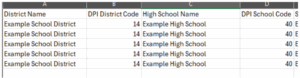
Make sure that your District Code and School Code are being generated accurately.
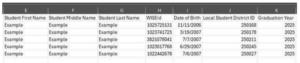
Verify your students’ names, IDs, and graduation years are being reported accurately. Only the upcoming cohorts graduation year should be included.
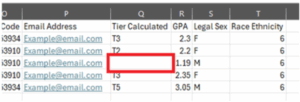
Verify the students’ GPA is on a 4.0 unweighted scale AND there is a tier present (if the student should be receiving a direct admit offer).
Technical Review – Transcripts
The Universities of Wisconsin will need a .pdf bundle of all participating students in Direct Admit Wisconsin. The transcripts need to be machine readable, meaning they cannot be scanned into the system but must be generated from the SIS.
- The Transcripts should contain the cumulative unweighted 4.0 GPA of the student at the
end of the junior year - The Transcript should contain the WiseID of the student (if available)
- The Transcript should contain the school’s Student or local ID of the student
Lastly, ensure the naming convention of the files.
Naming Convention
- XXXX-ZZZZ-YYYYMMDD.csv – for the data file
- XXXX-ZZZZ-YYYYMMDD.pdf – for the transcript bundle
(Where XXXX is the zero-padded DPI district code, ZZZZ is the zero-padded DPI school code, and the YYYYMMDD is the date of generation.)
Academic Review
Once you run the report, it should generate a local copy. A counselor who is familiar with the students and their academic performance should review the report at this time to ensure it accurately reflects the students’ grades and tier assignments before submission. See our Academic Review documentation for more information.
Updated: 02/03/2026